Less Than Full-Time Loan Reductions
The One Big Beautiful Bill Act (H.R.1), signed into law on July 4, 2025, introduces significant changes to the federal Title IV student aid programs. Some of these changes impact the amount of loans awarded and disbursed based on enrolled credits. These updates will take effect on July 1, 2026 and will apply to loans borrowed in the 2026-2027 and future academic years.
Notice of Regulatory Status: The U.S. Department of Education has not yet issued the final regulations for the One Big Beautiful Bill Act. Consequently, the information and answers provided below reflect our best interpretation of the legislation and the preliminary outcomes of the Negotiated Rulemaking sessions. These details are subject to change once the official "Final Rules" are published. While a specific release date has not been set, the Department is expected to finalize these regulations by June 1, 2026. The Office of Student Financial Aid Services is actively monitoring the legislation and its implementation details. This page will be updated regularly as additional guidance becomes available from the U.S. Department of Education.
- Full-time Enrollment:
- Undergraduate students enrolled in 24 credits in an academic year are considered full time.
- Graduate students enrolled in 18 credits in an academic year are considered full time.
- Doctoral students enrolled in 18 credits in an academic year are generally considered full time. However, based on the research work, they may have a lesser number of credits to qualify as full time status.
- Half-time Enrollment: Students must be enrolled at least in a half-time load of financial aid-eligible classes to receive a Federal Direct Loan in any given semester. The minimum number of credits per semester to be considered half-time is:
- Undergraduates: 6 credit hours
- Graduate/Doctoral students: 4.5 credit hours (if 1.5 credit course is not available, 6 credits enrollment is required for federal loan awarding and disbursement)
- Loan Amount: A student can receive the full annual Federal Direct Loan amount as long as their financial aid eligibility allows them to do so.
- Loan Reduction: If a student withdraws from a class after the loan has been disbursed, the loan is not reduced. Loan may be reduced or canceled if a student withdraws from all courses.
- Full-Time Academic Year Definition: To be considered full-time for the academic year
- Undergraduate students: Must take 24 credit hours in an academic year.
- Graduate students: Must take 18 credit hours in an academic year.
- Doctoral students: Generally must take 18 credits in an academic year. However, based on the research work, they may have a lesser number of credits to qualify as full time status.
- Half-time Enrollment: Students must be enrolled for at least a half-time load of financial aid-eligible classes to receive a Federal Direct Loan in any given semester. The minimum number of credits per semester to be considered half-time is:
- Undergraduates: 6 credit hours
- Graduate/Doctoral students: 4.5 credit hours (if 1.5 credit course is not available, 6 credits enrollment is required for federal loan awarding and disbursement)
- Less than Full-Time Enrollment: Starting with the 2026-2027 award year, Direct Loan amounts for students who are not full-time for the full academic year will need to be adjusted based on enrollment.
Less than Full-Time Formula for Loan Reduction:
number of credit hours enrolled for academic year number of credit hours considered full time for that academic year for the program of studyx 100
= reduced annual loan limit percentage (rounded to nearest whole percentage point)
- Loan Reduction at the time of Disbursement:
At the time of loan reduction, the student's loan will be reduced based on the number of credits enrolled, even though they may have been awarded as a full-time student.
Loans Subject to Reduction: The loan reduction rule applies to all undergraduate, graduate, and doctoral student Federal Direct Loan borrowers, utilizing Direct Subsidized Loans, Direct Unsubsidized Loans, and Graduate PLUS Loans. Even those considered legacy borrowers who have borrowed from any of these loan programs prior to July 1, 2026 are subject to this rule.
Parent PLUS Borrowers: Since this rule only impacts student borrowing, the Federal Direct Parent PLUS Loan is not subject to these adjustments for less-than-full-time enrollment.
Loan Reduction Calculation Example
A dependent first-year student can borrow up to $5,500 in federal student loans for the school year. Student plans to take 12 credit hours in the Fall and 12 credit hours in the Spring, which makes them a full-time student.
- Full-time for the year = 24 credits (12 Fall + 12 Spring)
- Loan is disbursed in two equal payments:
- Fall: $2,750
- Spring: $2,750
- Total: $5,500
The student was enrolled in 12 credits in the Fall and dropped to 6 credits. The recalculation will be as follows:
- Fall: 6 credits
- Spring: 12 credits (expected)
- Total: 18 credits
Percent of credits completed: (18 / 24) x 100 = 75%
Reduced Loan Eligibility
Academic Year Eligibility x Percent Credits Completed
$5,500 x 75% = $4,125 (maximum loan eligibility for the academic year)
Federal Loan Repayment Changes
The One Big Beautiful Bill Act (H.R.1), signed into law on July 4, 2025, introduces significant changes to the federal Title IV student aid programs and repayment plans. If you are currently paying back federal student loans, it is highly recommended that you reach out to your loan servicer. They can help you navigate how these upcoming changes, triggered by the One Big Beautiful Bill, apply to your unique financial situation. While this page provides a general summary, individuals already in repayment need to speak with their servicer before deciding on their next steps.
Notice of Regulatory Status: The U.S. Department of Education has not yet issued the final regulations for the One Big Beautiful Bill Act. Consequently, the information and answers provided below reflect our best interpretation of the legislation and the preliminary outcomes of the Negotiated Rulemaking sessions. These details are subject to change once the official "Final Rules" are published. While a specific release date has not been set, the Department is expected to finalize these regulations by June 1, 2026. The Office of Student Financial Aid Services is actively monitoring the legislation and its implementation details. This page will be updated regularly as additional guidance becomes available from the U.S. Department of Education.
- Fixed-Term Plans:
- Standard Repayment
- Graduated Repayment
- Extended Repayment
- Income Sensitive Repayment
- Income-Driven Plans (IDR):
- Income-Based Repayment (IBR)
- Pay As You Earn (PAYE)
- Saving on a Valuable Education (SAVE)
- Replaced Revised Pay As You Earn (REPAYE)
- Income-Contingent Repayment (ICR)
First Loan Borrowed on or after July 1st, 2026
- New Standard Repayment Plan:
- Four Fixed-Terms:
- 10 years: balances <$25,000
- 15 years: balances between $25,000-$49,999
- 20 years: balances between $50,000-$99,999
- 25 years: balances $100,000+
- Only 10-year plans qualify for Public Service Loan Forgiveness (PSLF). Note: PSLF requires at least 10 years of repayment.
- Four Fixed-Terms:
Student borrowers who do not select a plan will be placed into the Standard Plan.
New Income-Based Repayment Assistance Plan (RAP):
- Monthly payment: 1%-10% of Adjusted Gross Income (AGI)
- $10 minimum payment
- $50 deduction per dependent
- 30-year repayment term; forgiveness after 30 years
- No negative amortization (balances won't grow when payments don't cover interest)
- Payments count toward PSLF
| Borrowers' AGI | Monthly Payment |
|---|---|
| Less than $10,000 | $10/month |
| $10,000 - $19,999 | 1% of monthly AGI |
| $20,000 - $29,999 | 2% of monthly AGI |
| $30,000 - $39,999 | 3% of monthly AGI |
| $40,000 - $49,999 | 4% of monthly AGI |
| $50,000 - $59,999 | 5% of monthly AGI |
| $100,000+ | 10% of monthly AGI |
Current Borrowers
- IBR borrowers may remain in their plan
- All other non-Parent PLUS IDR borrowers must choose a new plan by July 1, 2028 or be moved to RAP
- Parent PLUS loan borrowers will be moved to the new Standard Plan after July 1st, 2028 unless they consolidate and enroll in an IDR before July 1, 2026. Doing so means they can remain in IBR for the duration of the repayment period.
FAFSA & Pell Grant Changes
The Free Application for Federal Student Aid (FAFSA) is required for Federal aid eligibility consideration. The One Big Beautiful Bill Act (H.R.1), signed into law on July 4, 2025, introduces significant changes to the 2026-2027 FAFSA application and Pell Grants. These updates will take effect on July 1, 2026.
- Family farms and family-owned small businesses will no longer be counted as assets (reverting to rules before FAFSA Simplification).
- Family Farm - A family farm on which the family resides
- Small Business - A family-controlled small business with not more than 100 full-time or full-time equivalent employees
- Family-owned commercial fisheries are now also exempt from asset reporting. This includes fishing vessels and permits owned and controlled by the family.
- Foreign Income
Pell Grant calculation formula is modified to incorporate foreign earned income for Pell Grant eligibility purposes.
- Students with a Student Aid Index greater than twice the maximum Pell Grant amount will be ineligible for the Pell Grant. Example: If the max Pell Grant is $7,395, students with an SAI over $14,790 will not qualify.
- This does not apply to special Pell Grant rules (formerly known as the Iraq Afghanistan Service Grant [IASG] and the Children of Fallen Heroes [CFH] Scholarship).
- Students whose Cost of Attendance (COA) is fully covered by non-federal scholarships and grants will be ineligible for a Federal Pell Grant. Example: A Pell-eligible student with a scholarship or state grant covering the full Cost of Attendance will no longer receive both the scholarship and the Pell Grant.
The One Big Beautiful Bill Act (H.R. 1), signed into law on July 4, 2025, introduces significant changes to Pell Grants, federal student and parent loans, repayment plans, and the 2026–2027 FAFSA application. These updates will take effect on July 1, 2026.
Notice of Regulatory Status: The U.S. Department of Education has not yet issued the final regulations for the One Big Beautiful Bill Act. Consequently, the information and answers provided below reflect our best interpretation of the legislation and the preliminary outcomes of the Negotiated Rulemaking sessions. These details are subject to change once the official "Final Rules" are published. While a specific release date has not been set, the Department is expected to finalize these regulations by June 1, 2026. The Office of Student Financial Aid Services is actively monitoring the legislation and its implementation details. This page will be updated regularly as additional guidance becomes available from the U.S. Department of Education.
Select a program below for detailed information, including the Frequently Asked Questions. We are updating this page regularly as new details emerge.
Federal Direct Parent PLUS Loan
The One Big Beautiful Bill Act (H.R.1), signed into law on July 4, 2025, introduces significant changes to the federal Title IV student aid programs. Some of these changes impact the Federal Direct Parent PLUS Loans available to parents of undergraduate, dependent students. These updates will take effect on July 1, 2026.
Notice of Regulatory Status: The U.S. Department of Education has not yet issued the final regulations for the One Big Beautiful Bill Act. Consequently, the information and answers provided below reflect our best interpretation of the legislation and the preliminary outcomes of the Negotiated Rulemaking sessions. These details are subject to change once the official "Final Rules" are published. While a specific release date has not been set, the Department is expected to finalize these regulations by June 1, 2026. The Office of Student Financial Aid Services is actively monitoring the legislation and its implementation details. This page will be updated regularly as additional guidance becomes available from the U.S. Department of Education.
- Annual Limit: Determined by the formula of Cost of Attendance – Other Aid (i.e. grants, scholarships, other loans)
- Aggregate Limit: No limit
- Eligibility is based on student enrollment and a credit check of the parent applicant
- Annual Limit: $20,000 per student (combined from all parents)
- Aggregate Limit: $65,000 per student
- Legacy Provision: Students with any existing Direct Loan may continue borrowing for up to 3 years or for the remainder of their expected time to complete the program, within the published length of time to do so, whichever is less.
- New Borrowers: Must seek alternative funding if limits are exceeded
Families requiring financial support beyond the revised federal loan caps ($20,000/year for Parent PLUS) should review the following supplemental funding options:
- Scholarship Universe
Matches students with external scholarship opportunities - Private Education Loans
Apply for a private loan - Payment Plans
Sign up for a payment plan
Final regulations for the One Big Beautiful Bill Act have not yet been published by the U.S. Department of Education. The information below is based on our current interpretation of the statute and available information from the Negotiated Rulemaking process. Please be advised that these FAQs are subject to change pending the issuance of final federal rules which are expected by June 1, 2026.
A "Legacy Borrower" is a parent of a current NJIT student who has borrowed a Federal Direct Loan (i.e. Subsidized, Unsubsidized or Parent PLUS) for the 2025-2026 academic year before July 1, 2026. To qualify, the loan must have been disbursed before this date.
Parents are considered a Legacy Borrower if:
- The student borrowed a Federal Direct Subsidized or Unsubsidized Loan at NJIT, even if the parent did not borrow a Parent PLUS loan
- Parent borrowed a Federal Direct Parent PLUS Loan for the student
| Qualification | Legacy Status? |
|---|---|
| Student had a Sub/Unsub loan disbursed before July 1, 2026 | YES |
| Parent had a PLUS loan disbursed before July 1, 2026 | YES |
| First Federal Direct Loan of any kind is disbursed after July 1, 2026 | NO |
To continue borrowing under the current loan limits, you must be considered a legacy borrower. A legacy borrower may continue borrowing under the current limits for 3 years or until the student completes their program, whichever is shorter.
Yes, Parent PLUS borrowers can lose eligibility due to the following:
Continuous Enrollment Requirement
The student of a legacy borrower for the Parent PLUS Loan must be continuously enrolled. For example, legacy borrowers will lose eligibility to continue using the Parent PLUS Loan under the pre-July 1, 2026 rules if:
- Student takes a fall or spring semester off
- Student begins enrollment in a fall or spring semester and withdraws completely from that semester
Summer is generally excluded from the continuous enrollment requirement, so a borrower will not lose eligibility for not taking classes in the summer.
Three Years of Eligibility
Legacy borrowers can only retain eligibility for the Parent PLUS Loan for 3 academic years after July 1, 2026, or the remainder of the student's program of study, whichever is shorter.
Changing Majors
Legacy borrowers will not lose eligibility if the student changes majors to a different undergraduate degree program after July 1, 2026. However, changing majors may extend the student's time to complete their degree, exceeding the 3-year maximum allowed for legacy status. If that occurs, parents may lose access to the Federal Direct Parent PLUS Loan program under the pre-July 1, 2026 rules before the student graduates.
Students of legacy borrowers must be continuously enrolled. For example, legacy borrowers will lose legacy status if the student:
- Does not enroll in a fall or spring semester
- Begins enrollment in a fall or spring semester and withdraws completely from that semester
Summer is generally excluded from the continuous enrollment requirement, so a borrower will not lose eligibility for not taking classes in the summer.
A "year" for legacy purposes is an academic year, not a calendar year.
No. Legacy borrower rules require enrollment in the same degree program at the same institution. Transfer students do not qualify for legacy status.
Also, any Parent PLUS loans borrowed at the other institution will count toward the $65,000 lifetime limit under the new rules.
Example Calculation
- Lifetime Limit: $65,000
- Minus amount borrowed at previous schools: -$50,000
- Remaining eligibility at NJIT: $65,000 - $50,000 = $15,000
Note: If you have already borrowed $65,000 or more for this student at other institutions, you will have no remaining Federal Parent PLUS Loan eligibility at NJIT.
Undergraduate degree programs generally have a 4-year published program length. This means the program should be completed in 4 years. We will use this maximum time as the time allowed to complete the degree.
Example 1
Published Program Length: 4 years
The undergraduate student completes their first year at the end of the 2025-2026 academic year and is scheduled to return for their second year in 2026-2027. Parent borrowed Parent PLUS for the 2025-2026 year. Student has completed one year of the program and has 3 years remaining under the legacy rules.
| Academic Year | Period Enrolled | Legacy Status |
|---|---|---|
| 2025-2026 | Year 1 | N/A |
| 2026-2027 | Year 2 | Legacy eligible |
| 2027-2028 | Year 3 | Legacy eligible |
| 2028-2029 | Year 4 | Legacy eligible |
| 2029-2030 | Year 5 | Not eligible for legacy |
Example 2
Published Program Length: 4 years
The undergraduate student completes their second year at the end of the 2025-2026 academic year and is scheduled to return for their third year in 2026-2027. Parent borrowed Parent PLUS for the 2025-2026 year. Student has completed two years of the program and has 2 years remaining under the legacy rules.
| Academic Year | Period Enrolled | Legacy Status |
|---|---|---|
| 2024-2025 | Year 1 | N/A |
| 2025-2026 | Year 2 | N/A |
| 2026-2027 | Year 3 | Legacy eligible |
| 2027-2028 | Year 4 | Legacy eligible |
| 2028-2029 | Year 5 | Not eligible for legacy |
Example 3
Published Program Length: 4 years
The undergraduate student completes their third year at the end of the 2025-2026 academic year and is scheduled to return for their fourth year in 2026-2027. Parent borrowed Parent PLUS for the 2025-2026 year. Student has completed three years of the program and has 1 year remaining under the legacy rules.
| Academic Year | Period Enrolled | Legacy Status |
|---|---|---|
| 2023-2024 | Year 1 | N/A |
| 2024-2025 | Year 2 | N/A |
| 2025-2026 | Year 3 | N/A |
| 2026-2027 | Year 4 | Legacy eligible |
| 2027-2028 | Year 5 | Not eligible for legacy |
Example 4
Published Program Length: 4 years
The undergraduate student completes their fourth year at the end of the 2025-2026 academic year and is scheduled to return for their fifth year in 2026-2027. Parent has borrowed $80,000 for the Parent PLUS by the end of the 2025-2026 year. Student has completed four years of the program and has no remaining time under the legacy rules.
- Since the parent has already borrowed $80,000 and the new maximum limit is $65,000 under the new rules, parent is not eligible to borrow Parent PLUS anymore
- If the parent had borrowed $40,000 by the end of the 2025-2026 academic year, parent would have a remaining eligibility of $65,000 - $40,000 = $25,000. However, the maximum eligibility per academic year would be capped at $20,000
| Academic Year | Period Enrolled | Legacy Status |
|---|---|---|
| 2022-2023 | Year 1 | N/A |
| 2023-2024 | Year 2 | N/A |
| 2024-2025 | Year 3 | N/A |
| 2025-2026 | Year 4 | N/A |
| 2026-2027 | Year 5 | Not eligible for legacy |
As a new Parent PLUS borrower, the following annual and aggregate loan limits apply:
- Students may not receive more than $20,000 in a Parent PLUS loan in an award year (Fall, Spring, Summer).
- Students may not receive more than $65,000 aggregate for the total duration of the undergraduate degree program.
No. The $20,000 annual limit is based on the student, not the parent. The combined Parent PLUS loan amount for the student in an award year cannot exceed $20,000.
No. You do not meet the legacy borrower definition. Refer to the Legacy Borrower section.
We strongly encourage students to be on track to graduate in four years, as most undergraduate programs have a published length of four years. If you borrow $20,000 in the first three years, you would have remaining eligibility of $5,000 in the fourth year.
We encourage you to review your borrowing need and borrow less than $20,000 each year, as there is no need to borrow the full amount every year. Also, refer to the Additional Financing Options section.
Federal Direct Graduate PLUS Loan
The One Big Beautiful Bill Act (H.R.1), signed into law on July 4, 2025, introduces significant changes to the federal Title IV student aid programs. Some of these changes impact Federal Direct Graduate PLUS Loans. These updates will take effect on July 1, 2026.
Notice of Regulatory Status: The U.S. Department of Education has not yet issued the final regulations for the One Big Beautiful Bill Act. Consequently, the information and answers provided below reflect our best interpretation of the legislation and the preliminary outcomes of the Negotiated Rulemaking sessions. These details are subject to change once the official "Final Rules" are published. While a specific release date has not been set, the Department is expected to finalize these regulations by June 1, 2026. The Office of Student Financial Aid Services is actively monitoring the legislation and its implementation details. This page will be updated regularly as additional guidance becomes available from the U.S. Department of Education.
- Annual Limit: Determined by the formula of "Cost of Attendance - Other Aid (i.e. grants, scholarships, other loans)"
- Aggregate Limit: No limit
- Eligibility: Based on enrollment and credit check of the student
- Loan Reduction: Loans are not reduced based on enrollment. The minimum enrollment requirement is half-time
This program is eliminated for new borrowers.
- Legacy Provision: NJIT students who borrowed a Federal Direct Graduate Unsubsidized or a Graduate PLUS loan in the 2025-2026 academic year before July 1, 2026, may continue borrowing for up to 3 years or for the remainder of their expected time to complete the program, within the published length of time to do so, whichever is less.
- Loan Reduction: Loans must be reduced when students are not enrolled full-time. The reduction is based on the enrollment status and Cost of Attendance. Full time enrollment for graduate students is 9 credits/term
Students requiring additional financing options should review the following supplemental funding options:
- Private Education Loans
Apply for a private loan - Payment Plans
Sign up for a payment plan
The Federal Direct Graduate PLUS Loan program has been eliminated for new borrowers, effective July 1, 2026. Graduate students will now be limited primarily to Federal Direct Unsubsidized Loans, with an annual cap of $20,500 and lifetime loan limits of $100,000 (not including undergraduate loans). New borrowers are defined as anyone who has not received a federal student loan disbursed before July 1, 2026.
Under certain rules, the law allows current borrowers to continue borrowing from the program for 3 years or until they complete their program, whichever is shorter. If you meet the criteria to be considered a legacy borrower, then you can continue using the Federal Direct Graduate PLUS Loan Program.
A legacy borrower is a current NJIT student who has borrowed any Federal Direct Loan (i.e. Direct Unsubsidized or Graduate PLUS) before July 1, 2026 for the 2025-2026 academic year at NJIT. Borrowing a loan before July 1, 2026, means the loan was disbursed before that date.
Graduate students may qualify for “legacy” status if:
- They borrowed Federal Direct Unsubsidized or Graduate PLUS for 2025- 2026 under their current program of study, and they had the loan disbursed prior to July 1, 2026, and
- They remain enrolled in the same eligible program, and
- They remain continuously enrolled (you are still considered continuously enrolled even if you don’t take summer classes).
Legacy eligibility is available for up to three years or for the remainder of their expected time to complete the program, within the published length of time to do so, whichever is less. General loan eligibility and credit approval requirements still apply.
A borrower can lose “legacy” status for a few reasons:
Continuous Enrollment Requirement
Legacy borrowers must be continuously enrolled. For example, legacy borrowers will lose eligibility to continue using the Graduate PLUS Loan if they:
- Take a fall or spring semester off
- Begin enrollment in a fall or spring semester and withdraw partially through it
If attendance in the summer term is not required as part of a student’s academic degree requirements, then summer is excluded from the continuous enrollment requirement, so a borrower will not lose eligibility for not taking classes in the summer.
Three Years of Eligibility
Legacy borrowers can retain eligibility for the Graduate PLUS Loan for only 3 academic years after July 1, 2026, or for the remainder of their program of study, whichever is shorter.
Changing Programs
Legacy borrowers will lose eligibility if they change to a different graduate or professional program after July 1, 2026.
No, you cannot be considered a legacy borrower because you are starting a new program after July 1, 2026.
A “year” for legacy purposes is an academic year (not a calendar year).
The Federal Direct Graduate Unsubsidized Loan remains available for all graduate students. You can learn more about the loan here.
Other options may be available through private lenders.
Generally, graduate degree programs have a published program length of 2 years. This means the program must be completed within 2 years.
Example 1
Published Program Length: 2 years
The student completes their first year at the end of 2025-26 and is scheduled to return for their second year in 2026-27. The student borrowed a Graduate PLUS loan in 2025-2026.
| Academic Year | Period Enrolled | Legacy Status |
|---|---|---|
| 2025-2026 | Year 1 | N/A |
| 2026-2027 | Year 2 | Legacy eligible |
| 2027-2028 | Year 3 | Not eligible for legacy |
Example 2
Published Program Length: 2 years
The student completes their second year at the end of 2025-26 and is scheduled to return for a third year in 2026-27. The student borrowed a Graduate PLUS loan in 2025-2026.
| Academic Year | Period Enrolled | Legacy Status |
|---|---|---|
| 2024-2025 | Year 1 | N/A |
| 2025-2026 | Year 2 | N/A |
| 2026-2027 | Year 3 | Not eligible for legacy |
Example 3
Published Program Length: 3 years
The student completes their first year at the end of 2025-26 and is scheduled to return for a second year in 2026-27. The student did not borrow a Federal Direct Unsubsidized or Graduate PLUS loan in 2025-2026.
| Academic Year | Period Enrolled | Legacy Status |
|---|---|---|
| 2025-2026 | Year 1 | N/A |
| 2026-2027 | Year 2 | Not eligible for Grad PLUS |
No. The Financial Aid Office cannot override the legacy status or eligibility requirements.
Beginning July 1, 2026, Federal Direct Loan amounts will be reduced for students enrolled less than full-time. Fulltime enrollment is generally defined as 9 credits/semester for graduate students. If you take fewer than 18 credits for the academic year, your Federal Direct Loan amounts will be reduced proportionally to the actual credit load.
Federal Direct Graduate Unsubsidized Loan
The One Big Beautiful Bill Act (H.R.1), signed into law on July 4, 2025, introduces significant changes to the federal Title IV student aid programs. Some of these changes impact Federal Direct Graduate Unsubsidized Loans. These updates will take effect on July 1, 2026.
Notice of Regulatory Status: The U.S. Department of Education has not yet issued the final regulations for the One Big Beautiful Bill Act. Consequently, the information and answers provided below reflect our best interpretation of the legislation and the preliminary outcomes of the Negotiated Rulemaking sessions. These details are subject to change once the official "Final Rules" are published. While a specific release date has not been set, the Department is expected to finalize these regulations by June 1, 2026. The Office of Student Financial Aid Services is actively monitoring the legislation and its implementation details. This page will be updated regularly as additional guidance becomes available from the U.S. Department of Education.
- Annual Limit: $20,500
- Aggregate Limit: $138,500 (includes undergraduate borrowed loans)
- Loan Reduction: Graduate Unsubsidized loans are not reduced based on enrollment. The minimum enrollment requirement is half-time.
- Graduate Students:
- Annual Limit: $20,500
- Aggregate Limit: $100,000 (excludes undergraduate loans)
- Loans must be reduced when students are not enrolled full-time. The reduction is based on the enrollment status. Full-time enrollment for graduate students is 9 credits/term. For details, see Less Than Full-Time Loan Reductions
- Professional Students:
- NJIT does not have professional degree programs
- Annual Limit: $50,000
- Aggregate Limit: $200,000 (combined graduate and professional loans but excludes undergraduate loans)
- Total Aggregate Limit: $257,500 for all federal loan programs (undergraduate and graduate)
Students requiring additional financing options should review the following supplemental funding options:
- Private Education Loans
Apply for a private loan - Payment Plans
Sign up for a payment plan
NJIT does not have a “professional” degree program.
Under 34 CFR 685.102(b), the following are considered professional programs:
- Pharmacy (Pharm.D.)
- Dentistry (D.D.S. or D.M.D.)
- Veterinary Medicine (D.V.M.)
- Chiropractic (D.C. or D.C.M.)
- Law (L.L.B. or J.D.)
- Medicine (M.D.)
- Optometry (O.D.)
- Osteopathic Medicine (D.O.)
- Podiatry (D.P.M., D.P., or Pod.D.)
- Theology (M.Div. or M.H.L.)
- Clinical Psychology (Psy.D. or Ph.D.)
No, the statute and federal regulations set the standards for defining a “professional” program. Unfortunately, there is no appeal process.
Beginning July 1, 2026, Federal Direct Loan amounts will be reduced for students enrolled less than full-time. Fulltime enrollment is generally defined as 9 credits/semester for graduate students. If you take fewer than 18 credits for the academic year, your Federal Direct Loan amounts will be reduced proportionally to the actual credit load.
Federal Direct Undergraduate Loans
The One Big Beautiful Bill Act (H.R.1), signed into law on July 4, 2025, introduces significant changes to the federal Title IV student aid programs. Some of these changes impact Federal Direct Undergraduate Loans. These updates will take effect on July 1, 2026.
Notice of Regulatory Status: The U.S. Department of Education has not yet issued the final regulations for the One Big Beautiful Bill Act. Consequently, the information and answers provided below reflect our best interpretation of the legislation and the preliminary outcomes of the Negotiated Rulemaking sessions. These details are subject to change once the official "Final Rules" are published. While a specific release date has not been set, the Department is expected to finalize these regulations by June 1, 2026. The Office of Student Financial Aid Services is actively monitoring the legislation and its implementation details. This page will be updated regularly as additional guidance becomes available from the U.S. Department of Education.
- Annual and aggregate limits are based on dependency status
- Dependent Students
- Freshman: $5,500
- Sophomore: $6,500
- Junior/Senior: $7,500
- Independent Students
- Freshman: $9,500
- Sophomore: $10,500
- Junior/Senior: $12,500
- Maximum Lifetime Loan Limit:
- Dependent: $31,000 total
- Independent: $57,500 total
- Loans must be reduced when students are not enrolled full-time. The reduction is based on their enrollment status.
Full Time Enrollment Status at NJIT:- Undergraduates: 12 credits/term
- For more information on loan reductions, please visit Less Than Full-Time Loan Reductions
- Undergraduate Annual Limits: Unchanged
- Undergraduate Aggregate Limit: Unchanged
- Total Aggregate Limit: $257,500 across all federal loan programs (undergraduate and graduate)
Students requiring additional financing options should review the following supplemental funding options:
- Scholarship Universe
Matches students with external scholarship opportunities - Parent PLUS Loans
Parents of a dependent student can apply for a Federal Direct Parent PLUS loan. - Private Education Loans
Apply for a private loan - Payment Plans
Sign up for a payment plan
Students earn 1 hour of paid sick leave for every 30 hours worked, up to a maximum of 40 hours of earned sick leave per benefit year (NJIT has defined the benefit year as July 1 through June 30);
Students begin accruing paid sick leave upon date of hire; however, there is a 120 day wait before a student can begin to use the time;
Students can carry over up to 40 hours of earned paid sick leave into the next benefit year but are still limited to the use of only 40 of earned sick leave in any given benefit year.
Determining Availability of Hours:
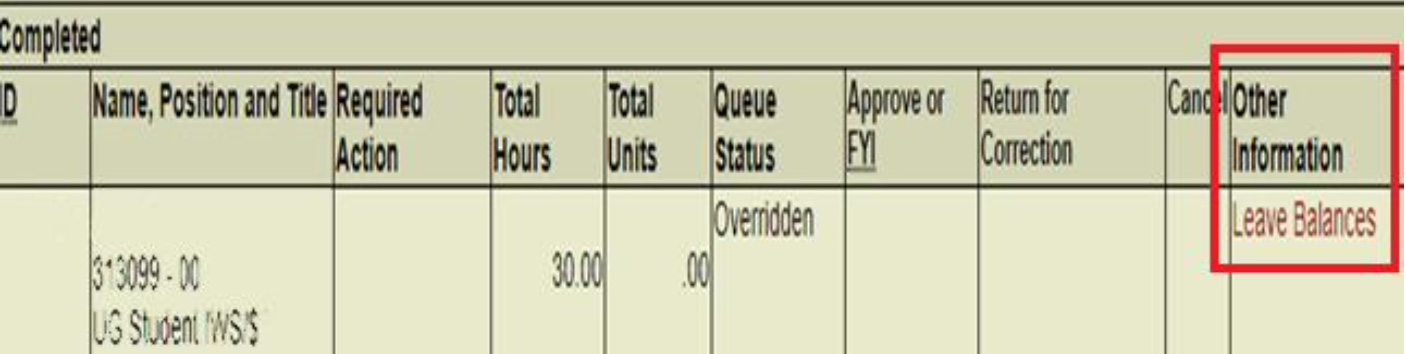
Students (and supervisors) are able to view the earned number of hours available (and the date available) via the student’s online timesheet by clicking on “Leave Balances” next to the student’s name:
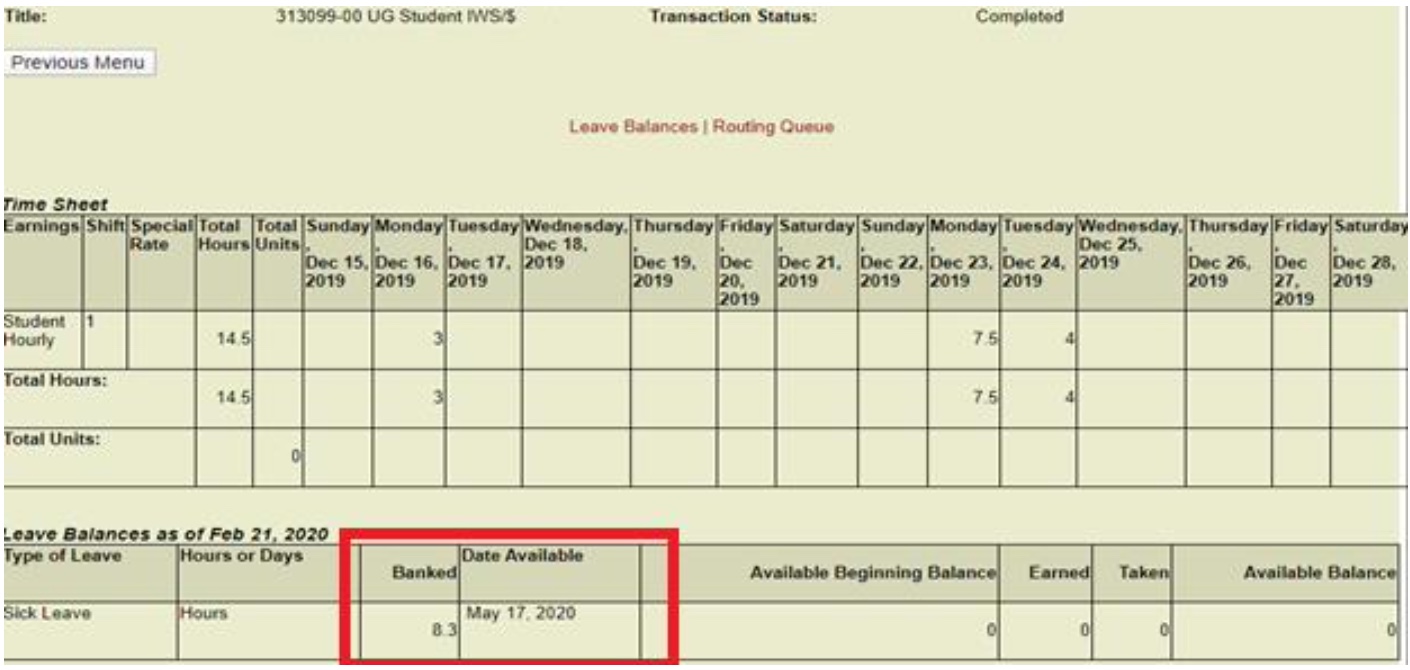
Student – No Available Hours:
In the example below, the student has 8.3 hours “banked”; however, the student cannot use these hours until May 17, 2020 as the student has not passed the 120-day waiting period:
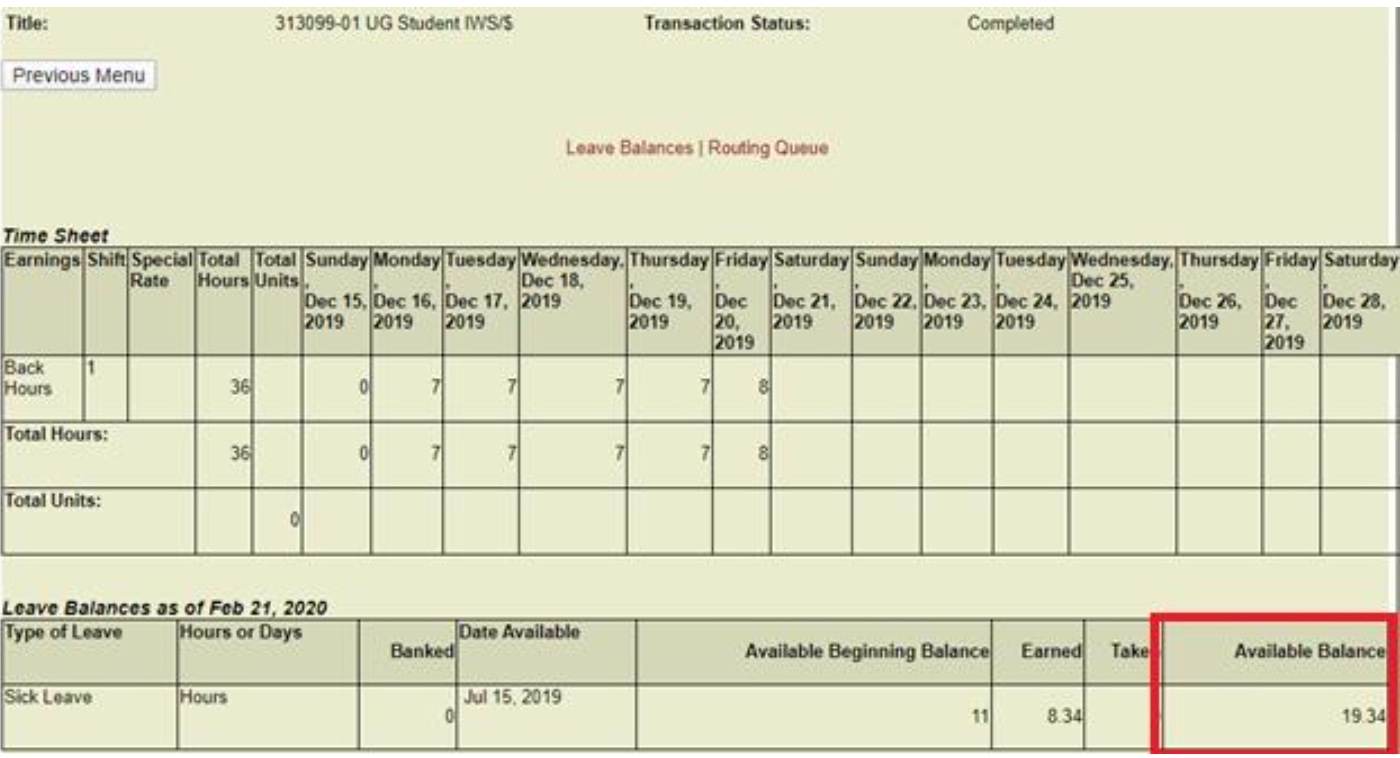
Student – Available Hours:
Below is an example of a student who has passed the 120-day waiting period and has 19.34 hours of earned sick leave available:
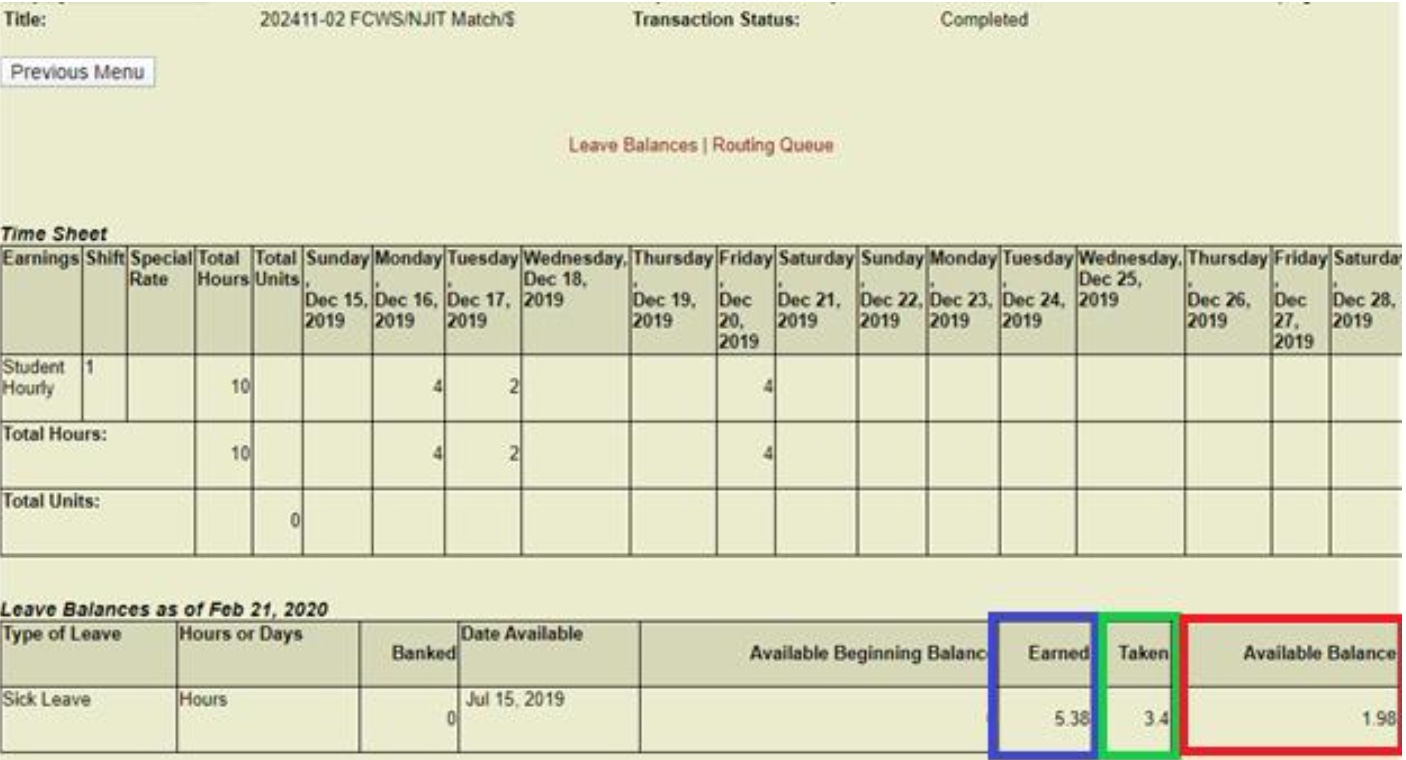
Student – Utilized Hours:
The example below shows a student who has utilized 3.4 hours of earned sick leave, with updated availability:
Acceptable Reasons to Use NJ Earned Sick Leave:
Pursuant to the New Jersey Earned Sick Leave Law, students may use NJ earned sick leave for the reasons below:
- Student or a family member needs diagnosis, care, treatment or recovery from an illness, or preventative medical care;
- Student or a family member have been the victim of domestic or sexual violence and needs time for treatment, counseling or to prepare for a court proceeding;
- Student needs to attend school-related conferences, meetings or events regarding their child’s education or to attend a school-related meeting regarding their child’s health;
- Student needs to care for their child if their school or child-care provider is closed due to a public health emergency;
- The university closes due to a public health emergency.
Please note that sick leave accrued under the New Jersey Earned Sick Leave Law may not be used for bereavement or to bond with a newborn, newly adopted or foster child.
Requests for Time Off and Approval:
Where at all possible, students should submit requests to use earned sick leave to their supervisor 7 days in advance. If their need for earned sick leave is unforeseeable, students should provide as much notice as possible. Please note that sick time can only be utilized during a scheduled shift; for example, if you are scheduled to work from 10:00-2:00 and you request 1 hour of sick time, the timesheet for that day should reflect 3 hours worked and 1 hour of sick time.
Documentation:
Reasonable documentation may be required if a student uses earned sick leave on three or more consecutive work days. Please note that documentation from the health care provider should NOT specify the medical reason for the student’s leave to their supervisor; students should submit all documentation to their supervisor.
Student and Tuition/Fee Support Stipend Payment Request
This form is to be completed only for a student employee receiving a stipend payment (and tuition and fee support if applicable). If your request does not meet the stipend definition, you will post the position as an hourly position; to post as an hourly position follow these steps:
- Log into Highlander Pipeline
- Go to the Faculty/Staff Service card
- Click Employee Recruitment System
The online stipend system will not allow you to proceed if your request is not a stipend. To learn more about the distinction between hourly and stipend positions, go here.
A stipend is a fixed amount of financial support provided to a student, trainee, or researcher to assist with living or educational expenses during their participation in an academic, research, or training program. A stipend is not considered compensation for services rendered and is not contingent upon hours worked or specific job performance. Its purpose is to enable recipients to engage fully in their educational or research activities without the expectation of employment-related duties.
Typical Uses:
- Research or fellowship participation
- Academic traineeships
For additional information on this process, feel free to contact Renetta Omar at finaid@njit.edu.